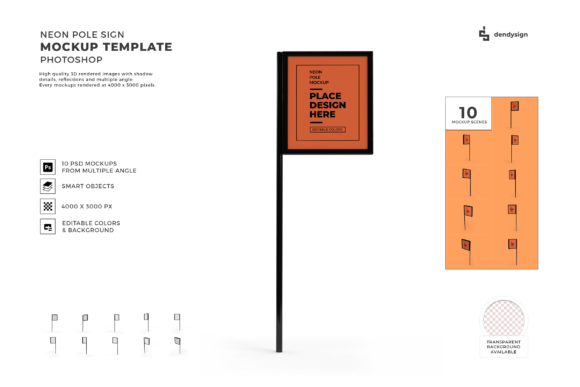
Neon Pole Sign 3D Mockup Template Bundle
When you are designing a brand identity or planning a storefront, the visual representation of your signage is often the first thing that catches the eye. A flat image rarely conveys the same impact as a realistic rendering. This is where the Neon Pole Sign 3D Mockup Template Bundle becomes an essential tool in your design arsenal. Whether you are a seasoned graphic designer looking to streamline your client presentations or a small business owner trying to visualize how a new sign will look on your building, this resource offers a practical solution for bridging the gap between concept and reality.
The appeal of neon signs lies in their vibrant energy and retro-modern aesthetic. However, creating a high-quality 3D render from scratch requires advanced skills in software like Blender or Cinema 4D, which can be time-consuming and costly. By utilizing a pre-made mockup bundle, you bypass the technical hurdles of lighting, texture mapping, and perspective adjustment. Instead, you get immediate access to a professional-grade environment that allows you to focus on the creative aspect of your design rather than the engineering of the scene.
Understanding the Value of PSD Format
One of the most critical aspects of this bundle is its format. The files are provided in Photoshop (PSD) format, which is the industry standard for raster graphics editing. While some might assume that a 3D mockup implies a complex 3D file that requires specialized software, these templates are cleverly constructed using Photoshop’s layer styles, smart objects, and blending modes to simulate three-dimensionality. This approach ensures compatibility with almost any version of Adobe Photoshop, making it accessible to a wide range of users.
If you are evaluating different resources online, always check the file extension before purchasing. Many low-quality listings claim to offer "3D" assets but deliver static JPGs or PNGs that lack editability. The Neon Pole Sign 3D Mockup Template Bundle distinguishes itself by offering fully editable PSD files. This means you are not just downloading a picture; you are acquiring a dynamic workspace where every element can be manipulated to fit your specific needs.
Common Mistakes When Using Mockups
Even with high-quality tools, users often make errors that diminish the final result. One frequent mistake is ignoring the resolution of the source file. Designers sometimes stretch a low-resolution smart object across a large canvas, resulting in pixelation when the mockup is exported for print or high-definition web display. To avoid this, always ensure that the High Resolution PSD File included in the bundle matches the output requirements of your project. If you plan to present the design on a large billboard or print it for a client meeting, starting with a high-DPI file is non-negotiable.
Another common oversight involves the handling of layers. Beginners often flatten the entire document too early in the process, losing the ability to tweak individual elements later. The bundle comes with Organized Layers, meaning the shadows, highlights, neon glows, and background textures are separated logically. Taking the time to understand this structure before you begin placing your logo will save you significant frustration. If you merge layers prematurely, you may find yourself unable to adjust the intensity of the neon glow or change the color of the pole independently.
There is also a misconception about transparency. Some users expect the mockup to come with a transparent background ready for immediate use in other applications. While the template provides a Transparent Background Available option, it is crucial to know how to export it correctly. Simply deleting the background layer in Photoshop does not guarantee a clean cutout if there are semi-transparent pixels around the edges of the sign. Use the "Select Subject" or "Color Range" tools carefully, and refine the edge detection to ensure the neon sign blends seamlessly into any new background you choose.
Benefits for Your Design Workflow
Integrating the Neon Pole Sign 3D Mockup Template Bundle into your workflow offers several tangible benefits that extend beyond simple aesthetics. For freelancers and agencies, speed is money. These templates allow you to produce multiple variations of a sign design in minutes rather than hours. You can experiment with different colors, fonts, and placements without committing to a physical prototype. This flexibility encourages creativity, allowing you to present clients with a variety of options that demonstrate the versatility of their brand.
For entrepreneurs and small business owners, the cost savings are equally significant. Hiring a 3D artist for custom renders can run into hundreds of dollars per image. With this bundle, you gain unlimited access to high-quality visuals for a one-time fee. This democratizes access to professional presentation materials, enabling hobbyists and startups to compete visually with larger corporations. The ease of use means that even those with limited design experience can create compelling images that communicate their vision effectively.
Key Features to Leverage
- Easy to Edit: Utilize smart objects to drop in your vector logos or text designs instantly. The mockup automatically adapts to the curvature and perspective of the sign.
- Realistic Lighting: The pre-set lighting effects mimic real-world neon behavior, including bloom and reflection, adding depth and authenticity to your designs.
- Versatile Applications: These mockups are not limited to outdoor signage. They work exceptionally well for social media graphics, website headers, and promotional flyers.
Evaluating Quality Before You Download
Before you commit to downloading the Neon Pole Sign 3D Mockup Template Bundle, take a moment to review the preview images closely. Look for consistency in the lighting and shadow directions. A high-quality mockup will have shadows that align logically with the light source, ensuring that the sign looks grounded in its environment. Additionally, check the detail of the neon tubes themselves. Poorly made mockups often feature blurry or jagged edges on the glowing parts, which can detract from the overall professionalism of your design.
It is also wise to test the template in your own software before relying on it for a major project. Open the PSD file and try replacing the placeholder text with your own. Observe how the layer styles react. Does the glow effect remain crisp? Do the shadows shift appropriately? This quick test will confirm that the file is intact and compatible with your version of Photoshop. Remember, the goal is to enhance your productivity, not to troubleshoot broken files during a deadline crunch.
Conclusion
The Neon Pole Sign 3D Mockup Template Bundle is more than just a collection of images; it is a strategic asset for anyone involved in visual communication. By providing high-resolution, organized, and easy-to-edit files, it empowers designers and business owners to create stunning presentations with minimal effort. Avoiding common pitfalls such as poor resolution handling and layer management will ensure that you get the most out of this investment. Whether you are launching a new brand or refreshing an existing one, using realistic mockups helps convey your message with clarity and impact. Download the bundle today and elevate your design projects with professional-grade neon signage visuals.