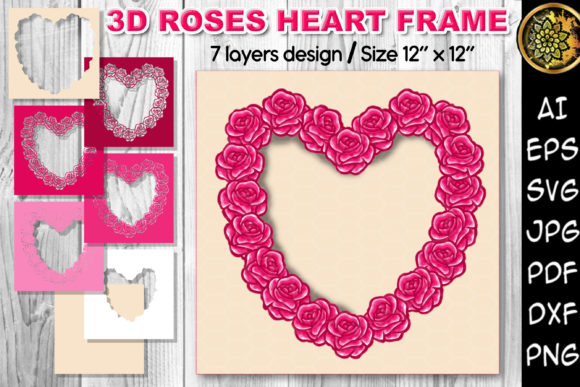
3D Valentine Roses Flowers Heart Frame
In the landscape of digital crafting and visual design, the distinction between a simple graphic and a functional asset often lies in its versatility and structural integrity. The 3D Valentine Roses Flowers Heart Frame represents a sophisticated intersection of aesthetic appeal and technical utility. It is not merely an image; it is a multi-layered vector resource designed to integrate seamlessly into complex creative workflows. For professionals ranging from small business owners creating branded merchandise to hobbyists executing intricate paper crafts, understanding how to leverage this specific asset can significantly enhance both efficiency and output quality.
This asset belongs to a broader category of multi-layered SVG clipart cut files, which have become indispensable tools in modern DIY projects and home decoration strategies. Unlike flat JPEGs or basic PNGs that offer limited depth, the 3D effect achieved through layered design allows for physical dimensionality when printed and cut. This guide explores the practical application of these files, focusing on preparation, compatibility with cutting machines, and strategic implementation in various creative and commercial contexts.
Understanding the Technical Architecture
To utilize the 3D Valentine Roses Flowers Heart Frame effectively, one must first understand its composition. The product is delivered as a comprehensive ZIP archive containing multiple file formats: AI, EPS, JPG, PDF, seven DXF files, seven SVG files, and seven PNG files with transparent backgrounds. This variety is not accidental; it is engineered to support different stages of the production pipeline.
The core value of this asset lies in its seven distinct layers. Each layer corresponds to a specific color or depth component of the final 3D image. When imported into design software, these layers remain separate, allowing the user to manipulate them independently. This separation is critical for creating the "pop" effect associated with 3D papercraft. By stacking these layers—often using foam tape or adhesive spacers during the physical assembly phase—the flat digital file transforms into a tangible object with shadow and depth.
The inclusion of vector formats (AI, EPS, SVG, DXF) ensures scalability without loss of quality. Whether you are designing a large wall decal for a wedding venue or a tiny embellishment for a greeting card, the lines remain crisp. The raster formats (JPG, PNG) serve as quick previews or for use in platforms that do not support vector editing, though they lack the precision required for machine cutting.
Integration with Digital Cutting Ecosystems
The primary workflow for utilizing this asset involves digital cutting machines such as the Cricut Explore, Silhouette Cameo, or other compatible plotters. The process begins with file selection and importation. Because the archive includes both SVG and DXF formats, users have flexibility depending on their preferred software environment. SVG files are generally preferred for Cricut Design Space and Silhouette Studio due to their native support for layer grouping and color separation.
Upon importing the SVG file, the next step is organization. In most design programs, the seven layers will appear as grouped elements. It is advisable to ungroup these elements and assign each layer a distinct name and color code. This organizational step is crucial for troubleshooting later. If a cut fails or a layer is misaligned, having a clearly labeled structure allows for rapid identification of the issue. Furthermore, this structured approach facilitates easy color changes. While the default design may feature solid colored layers, the vector nature of the file allows you to recolor any layer to match a specific brand palette or seasonal theme before sending the job to the cutter.
When preparing the design for export to the cutting machine, attention must be paid to registration marks if using multi-material cuts, though for single-color matting, this is less critical. The key is ensuring that the cut lines are set to "Cut" rather than "Draw" or "Score," unless specific scoring effects are desired within the frame design. Consistency in line weight and closure is vital; vector paths must be closed to ensure clean cuts, especially for intricate rose petals and heart shapes.
Physical Assembly and Material Considerations
The transition from digital file to physical decor requires careful material selection. The success of the 3D effect depends heavily on the rigidity and texture of the paper or cardstock used. Standard printer paper lacks the durability needed for frames intended for home decoration or long-term display. Instead, heavy-weight cardstock, chipboard, or specialty craft papers are recommended.
For the base layer, which typically forms the outer boundary of the heart frame, a stiffer material helps maintain structural integrity. Inner layers, particularly those forming the roses and flowers, can benefit from slightly softer papers that hold creases well but still provide enough body to stand up. The choice of adhesive is equally important. Foam mounting squares or double-sided foam tape are standard tools for creating the vertical distance between layers. However, for larger frames, liquid adhesives applied sparingly to the edges may provide a more secure bond without adding excessive bulk.
Quality control during assembly involves checking alignment. Since the layers are derived from the same source file, they should align perfectly if cut correctly. Misalignment often indicates a calibration issue with the cutting mat or blade depth. Regular maintenance of cutting blades is essential; dull blades can tear delicate rose details, ruining the 3D illusion. A sharp blade ensures clean edges that stack neatly, preserving the intended visual impact.
Strategic Use Cases and Workflow Applications
The versatility of the 3D Valentine Roses Flowers Heart Frame extends beyond personal hobbies into professional and commercial domains. Small business owners selling handmade goods can integrate this design into their product lines. For instance, it can serve as a premium packaging element for jewelry boxes, adding a tactile luxury experience for the customer. In this context, the asset is part of the branding workflow, enhancing perceived value through high-quality presentation.
Educators and classroom managers can utilize these files for interactive learning activities. Creating 3D art teaches students about geometry, spatial reasoning, and precision cutting. The multi-layered nature of the file allows for differentiated instruction; younger students might focus on assembling pre-cut layers, while older students can explore the design process by adjusting layer spacing or experimenting with mixed media.
Event planners and wedding coordinators can incorporate these frames into decor schemes. As wall art, photo backdrops, or table centerpieces, the 3D frame adds a focal point that photographs well. The ability to change colors via the SVG file means that a single purchase can be adapted for various themes—from traditional reds and pinks to monochromatic whites or even custom brand colors for corporate events. This adaptability reduces inventory costs and increases the utility of the initial investment.
Bloggers and content creators focused on DIY tutorials can use this asset as a centerpiece for instructional posts. The clear layer structure provides a natural framework for step-by-step guides. By documenting the process of converting the digital layers into a physical object, creators add value through education, driving engagement and establishing authority in the crafting niche. The transparency of the PNG files also aids in creating composite images for blog headers or social media graphics, where the frame needs to overlay other content without a white background.
Optimization for Long-Term Efficiency
To maximize the return on investment for this digital asset, proper file management is essential. Store the original ZIP archive in a dedicated folder structure, perhaps categorized by holiday or project type. Keep the master vector files backed up in cloud storage to prevent data loss. When modifying the design for future projects, save versions with new names rather than overwriting the original, maintaining a library of variations.
Additionally, consider the lifecycle of the materials. Paper crafts are subject to wear and environmental factors. For items intended for outdoor use or high-traffic areas, consider laminating the finished frames or using weather-resistant materials like vinyl or acrylic sheets, which can also be cut using the provided DXF or SVG files. This expansion of material options broadens the applicability of the design beyond traditional paper crafting.
Ultimately, the 3D Valentine Roses Flowers Heart Frame is more than a decorative element; it is a tool for execution. Its value is realized not just in its appearance, but in how smoothly it integrates into your creative processes. By mastering the technical aspects of file handling, material selection, and assembly, you transform a static digital image into a dynamic component of your workflow, whether that workflow is driven by artistic passion, educational goals, or commercial objectives. The endless possibilities offered by the multi-layered design encourage experimentation, allowing you to refine your techniques and produce work that stands out in both form and function.