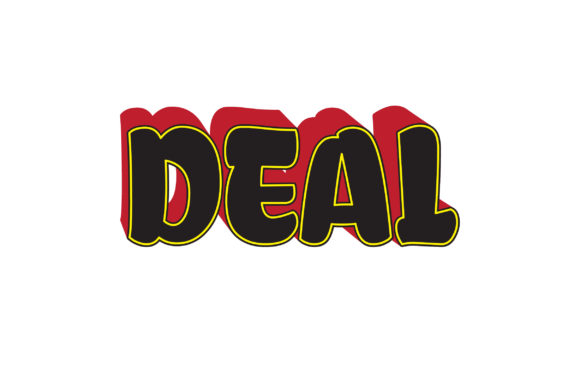
DEAL 3D Text Effect Vector
In the landscape of digital design, visual hierarchy is not merely an aesthetic choice; it is a functional necessity. When communicating complex information or promoting a product, the way text is rendered can dictate whether a message is absorbed or ignored. This is where specialized assets like the DEAL 3D Text Effect Vector become integral to a professional workflow. Rather than treating typography as an afterthought, integrating high-quality vector text effects allows creators to establish brand consistency and visual impact from the very first frame of a project.
This resource is designed for professionals who value efficiency without compromising on quality. Whether you are a marketer crafting a social media campaign, a freelancer designing a logo, or an entrepreneur preparing pitch decks, understanding how to integrate this specific text effect into your process can streamline production and elevate the final output. The following analysis explores the practical applications, technical advantages, and workflow integration of this asset.
Understanding the Asset and Its Technical Foundation
At its core, the DEAL 3D Text Effect Vector is a scalable graphic element that provides depth, dimension, and stylistic flair to standard typography. Unlike raster images, which pixelate when resized, vector-based designs maintain their crispness regardless of scale. This makes the asset particularly valuable in workflows that require versatility across different media types, from small mobile icons to large-format print banners.
The package includes multiple file formats, each serving a distinct purpose in the design pipeline:
- AI File (Adobe Illustrator): This is the primary source file for designers. It contains editable layers and paths, allowing for deep customization. If you need to adjust the color palette to match a specific brand guideline or tweak the geometry of the letters, the AI file is the starting point.
- EPS FILE: Encapsulated PostScript files are widely compatible with various desktop publishing and vector editing software. They serve as a robust backup or bridge format when working in environments that may not support native Adobe Creative Cloud files.
- High Quality JPEG File: For quick previews or contexts where transparency is not required, the JPEG offers a ready-to-use raster version. This is useful for rapid prototyping or embedding in basic document editors.
- High Quality PNG File Transparent: Transparency is critical when overlaying text effects onto existing backgrounds or photographs. The transparent PNG ensures that the 3D effect blends seamlessly without unwanted white boxes or background artifacts.
- High Quality SVG file: Scalable Vector Graphics are ideal for web development. Embedding the SVG directly into HTML code ensures fast loading times and perfect rendering on all screen resolutions, making it essential for responsive web design workflows.
The artboard size of 1200px by 1200px provides a generous canvas. This resolution is sufficient for most digital displays and social media platforms while remaining manageable in terms of file weight. It strikes a balance between high fidelity and performance, ensuring that the asset does not bog down your system during editing.
Integration into Pre-Production and Planning
Effective design begins before any pixels are moved. During the planning phase, having access to versatile assets like the DEAL 3D Text Effect Vector allows for more accurate mockups and concept presentations. Instead of creating rough sketches, you can use the actual vector elements to build realistic previews of how the final design will look.
This is particularly relevant for freelancers and agencies pitching to clients. By incorporating the 3D text effect into initial concepts, you demonstrate a higher level of polish and attention to detail. It reduces the gap between the proposal and the final deliverable, setting clear expectations regarding style and quality. Furthermore, because the vector files are editable, you can quickly iterate on variations—changing colors, fonts, or layouts—to explore different creative directions without starting from scratch.
Workflow Optimization During Execution
When moving into the execution phase, the modularity of the DEAL 3D Text Effect Vector becomes a significant time-saver. In many projects, consistency is key. Reusing a proven text effect across multiple assets ensures a cohesive visual identity. For example, if you are creating a series of social media posts for a product launch, using the same 3D text style for headlines creates a unified theme that reinforces brand recognition.
The availability of both AI and EPS files supports collaborative workflows. A designer might open the AI file to make fine adjustments, while a developer might utilize the SVG version for web implementation. This interoperability reduces friction in team settings, as different stakeholders can work with the format best suited to their tools. Additionally, the transparent PNG option simplifies compositing tasks in photo editing software like Photoshop. You can drag and drop the text effect over product images or backgrounds, adjusting opacity and blend modes to achieve the desired depth without manual tracing or complex masking techniques.
Compatibility and System Requirements
While the asset is versatile, it is important to consider the software environment. The AI file requires Adobe Illustrator or a compatible vector editor. If your workflow relies on open-source tools like Inkscape, the EPS or SVG files will be the most reliable options. Always verify that your team’s software versions can read these formats to avoid compatibility issues that could delay project timelines.
For educators and content creators, the ease of use is another factor. The "Easy to use" designation implies that even users with intermediate skills can manipulate the asset effectively. However, familiarity with layer management and basic vector editing principles will enhance the ability to customize the effect. Taking time to organize your layers and name them appropriately within the AI file can save hours of confusion later, especially when revisiting the project after a break.
Post-Production and Long-Term Utility
The lifecycle of a design asset often extends beyond its initial use. The DEAL 3D Text Effect Vector is built for longevity. Because it is vector-based, it remains relevant as display technologies evolve. What looks sharp on a standard monitor today will also render crisply on high-DPI screens and future devices. This future-proofing is a crucial consideration for businesses investing in branding materials that need to remain consistent over years.
Moreover, the asset can be repurposed for different marketing channels. A 3D text effect designed for a YouTube thumbnail can be scaled down for a favicon or expanded for a website header. The ability to adapt the asset across mediums maximizes the return on investment. For bloggers and publishers, this means fewer resources spent on creating new graphics for every platform, allowing more focus on content creation itself.
Quality Control and Best Practices
To ensure the highest quality output, several best practices should be followed when integrating the DEAL 3D Text Effect Vector into your projects:
- Color Consistency: Use the AI file to extract exact color codes (HEX, RGB, CMYK) that match your brand guidelines. Avoid manually guessing colors, as this can lead to inconsistencies across different media.
- Resolution Checks: Even though vectors are scalable, always preview your designs at 100% zoom to check for any unintended aliasing or edge artifacts, especially when using the PNG exports.
- File Organization: Keep a dedicated folder structure for your assets. Store the original AI/EPS files separately from exported web-ready versions. This prevents accidental overwriting and maintains a clean workspace.
- Accessibility Considerations: When using 3D text effects, ensure that the contrast between the text and the background is sufficient for readability. Depth effects should enhance, not obscure, the message. Test your designs with grayscale filters to verify legibility.
Support and Continuous Improvement
A notable feature of this asset package is the offer of direct support. If you encounter any issues with file compatibility or have questions about customization, contacting the creator via their profile is recommended. This human element adds value to the purchase, providing a safety net for users who may be less experienced with vector editing. It encourages experimentation, knowing that help is available if the learning curve presents challenges.
In conclusion, the DEAL 3D Text Effect Vector is more than just a decorative element; it is a tool that enhances efficiency, consistency, and visual impact in professional workflows. By understanding its technical specifications and integrating it thoughtfully into your pre-production, execution, and post-production phases, you can elevate your design output. Whether you are a solo entrepreneur or part of a large marketing team, leveraging this asset contributes to a smoother, more effective creative process.