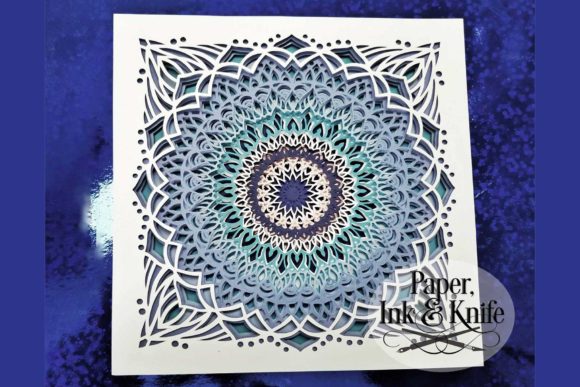
Mandala 4 3D Papercut Shadowbox
In a digital age where visual content is consumed in milliseconds, there remains a profound appeal in tangible, handcrafted art. The Mandala 4 3D Papercut Shadowbox represents the perfect intersection of traditional craftsmanship and modern digital precision. It is not merely a craft project; it is an exercise in patience, layering, and light manipulation that results in a stunning piece of wall decor or a thoughtful, personalized gift. For creators, designers, and hobbyists alike, this template offers a structured yet flexible framework to explore depth, shadow, and color in ways that flat design simply cannot achieve.
The Architecture of Depth
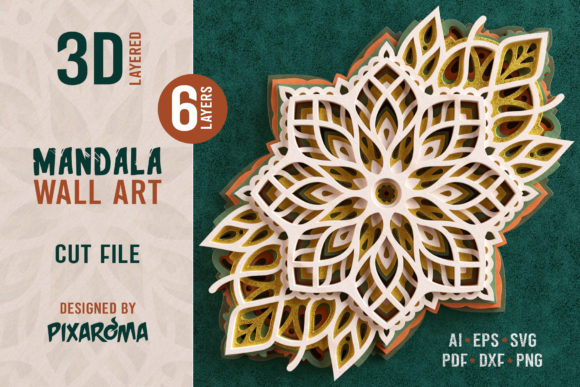
At its core, the Mandala 4 design utilizes ten distinct layers of papery goodness. This multi-layered approach transforms a simple 2D silhouette into a three-dimensional experience. When assembled correctly, each layer casts subtle shadows upon the one beneath it, creating a sense of infinite depth and intricate detail. The mandala motif itself—rooted in symbolism and geometric harmony—provides a balanced composition that is inherently pleasing to the eye. Whether you are looking to add a spiritual element to your home office or simply want to showcase your cutting machine’s capabilities, the structural integrity of this design ensures a professional finish every time.
The beauty of this specific template lies in its adaptability. While the default aesthetic often leans toward classic white-on-white elegance, the design invites experimentation. You can choose to cut all ten layers from pristine white paper for a clean, minimalist look that emphasizes the interplay of light and shadow. Alternatively, you can inject personality by assigning different colors to each layer. Imagine a gradient effect transitioning from deep indigo at the base to soft lavender at the top, or perhaps a vibrant rainbow spectrum that brings energy to a child’s room. The choice is entirely yours, limited only by your imagination and the palette of cardstock you have on hand.
Technical Versatility and File Formats
One of the most significant advantages of the Mandala 4 download is its comprehensive file support, catering to a wide range of skill levels and equipment. Whether you are a seasoned pro with a Cricut or Silhouette machine or a beginner preferring to cut by hand, the package includes everything needed for success. The inclusion of multiple formats ensures that no matter your workflow, you can execute this project with precision.
- SVG Files: Designed specifically for Cricut users, these files come in two variations: one with all layers stacked for quick assembly reference, and another with layers separated for individual cutting operations. This separation allows for precise control over alignment and spacing during the gluing process.
- DXF Files: Essential for Silhouette machine owners, ensuring compatibility with their proprietary software and cutting mats.
- EPS Files: Provided for vector programs like Adobe Illustrator or Inkscape, allowing designers to modify the paths, adjust scales, or integrate the mandala elements into larger graphic projects before exporting them for cutting.
- PDF Instructions & Cut Files: A dedicated instruction PDF guides you through the assembly process, while separate PDFs cater to those who prefer manual cutting. These include black outlines on white backgrounds, optimized for both Letter size (8 x 8 inches) and A4 size (18 x 18 cm) printing.
- JPG Images: High-resolution raster images are included for users who wish to resize the design manually via printer settings or use them as tracing guides for hand-cutting techniques.
Creative Applications Beyond Wall Art
While the primary intended use is as a framed shadowbox piece, the versatility of the Mandala 4 design opens doors to numerous creative applications. Its scalable nature means it can be adapted for various contexts, from educational tools to marketing materials.
Lighting and Atmosphere
A particularly spectacular variation involves integrating fairy lights between the layers. By placing small LED string lights behind the bottom layers and before the front-most layers, the mandala becomes a glowing lantern. The light diffuses through the paper, softening the edges and highlighting the intricate cutouts. This technique turns the artwork into a functional nightlight or ambient lighting fixture, perfect for bedrooms, meditation spaces, or cozy reading nooks. Even without added lighting, the natural shadow play within the box creates a dynamic visual that changes depending on the angle of ambient light in the room.
Customizable Framing Options
The template is sized perfectly for standard 8 x 8 inch shadowbox frames, making it easy to find affordable framing solutions at local craft stores or online retailers. However, the design can be easily resized using your machine’s cutting software or printer settings. If you desire a larger statement piece, you can scale up the SVG or DXF file to fit a 12 x 12 or even 16 x 16 inch frame. Conversely, for smaller displays or as part of a gallery wall, scaling down retains the clarity of the design due to the high resolution of the source files. Unframed, the layered stack itself serves as a sculptural object, resting elegantly on a shelf or desk.
Educational and Therapeutic Value
For educators and therapists, this project offers valuable hands-on learning opportunities. Assembling a ten-layer model requires fine motor skills, spatial reasoning, and sequential logic. It teaches the importance of organization—keeping track of which layer goes where—and patience, as rushing the process can lead to misalignment. In therapeutic settings, the repetitive motion of cutting and the meditative quality of the mandala pattern can serve as a calming activity, reducing stress and promoting mindfulness.
Best Practices for Assembly
To ensure your Mandala 4 3D Papercut Shadowbox looks professional, attention to detail during assembly is crucial. Start by organizing your layers in order. Using the provided files, you can print out a checklist or keep the digital reference open while you work. When gluing, use a thin-line adhesive pen or double-sided tape dots to avoid warping the paper. Apply glue sparingly to the edges and corners, working your way inward to prevent bubbles or visible glue spots.
If you are using colored paper, consider the flow of color from back to front. Darker colors in the background create a sense of distance, while lighter colors in the foreground pop forward. Test your color combinations on scrap paper before committing to the final layers. Additionally, ensure your cutting mat is clean and your blades are sharp to achieve crisp edges, which are vital for the clean shadow effects that define this style of papercut art.
Conclusion
The Mandala 4 3D Papercut Shadowbox is more than just a downloadable file; it is an invitation to slow down and engage in the tactile joy of creation. With its robust file support, adaptable design, and stunning visual potential, it appeals to a broad audience of makers and designers. Whether you are illuminating a dark corner with fairy lights, gifting a handmade masterpiece to a loved one, or simply enjoying the meditative process of assembly, this project delivers a rewarding result that stands out in any space. Embrace the layers, experiment with color, and watch as flat paper transforms into a captivating three-dimensional world.