Mastering the Art of Layered Craftsmanship with the Bunny 3D Laser Cut Template
In the evolving landscape of digital fabrication and creative design, the demand for intricate, multi-dimensional projects has never been higher. Whether you are a seasoned industrial designer, an educator teaching geometry through art, or a hobbyist looking to create unique home decor, the ability to translate flat digital files into tangible, three-dimensional objects is a crucial skill. At the heart of this process lies precision engineering and versatile file formats. The Bunny 3D Laser Cut Template stands out as a premier resource for creators seeking to bridge the gap between 2D vector graphics and 3D physical reality. This guide explores the technical specifications, material applications, and creative potential of this specific design asset, providing a comprehensive overview for anyone looking to integrate it into their workflow.
The Architecture of Multi-Layer Design
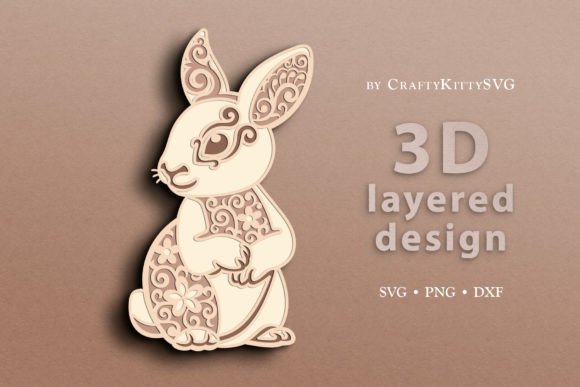
Understanding the structure of the Bunny 3D Laser Cut Template is the first step toward successful execution. Unlike standard single-layer cutouts that rely solely on silhouette, this item features a sophisticated 4-layer design. This architectural complexity allows for depth, shadow play, and structural integrity in the final product. Each layer is meticulously calculated to interlock or stack in a specific sequence, creating a cohesive image that appears to pop off the surface when assembled.
The use of multiple layers serves several functional purposes. First, it adds visual interest by introducing varying scales and details within the same subject. For instance, one layer might contain the fine details of the ears and whiskers, while another forms the solid base body. Second, it provides mechanical stability; layered structures often resist warping better than large, single-piece cuts, especially when working with thinner materials like cardstock or thin plywood. By distributing the design across four distinct planes, the template ensures that even the most delicate elements remain intact during handling and assembly.
File Format Versatility and Software Compatibility
One of the most significant advantages of modern digital craft templates is their adaptability to various cutting and engraving machines. The Bunny 3D Laser Cut Template is delivered as a single zip archive containing a suite of vector-based files designed to work seamlessly with industry-standard software. This multi-format approach ensures that users with different hardware setups can utilize the design without needing to convert files manually, which can sometimes lead to errors or loss of detail.
- SVG Files: These are the gold standard for computer-controlled cutting machines. The SVG (Scalable Vector Graphics) included in the archive is fully compatible with Cricut Design Space and Glowforge cutting and engraving software. Because SVGs are resolution-independent, you can scale the bunny design up to poster size or down to miniature keychain dimensions without any pixelation or loss of line quality. This makes them ideal for both large-scale wall art and small, detailed gifts.
- DXF Files: For users operating CNC laser machines or those who prefer Silhouette Studio, the DXF (Drawing Exchange Format) file is essential. DXF files are widely supported by CAD software and industrial-grade cutters. They ensure precise coordinate mapping, which is critical when using automated machinery that requires exact path data. If you are running a small business producing custom orders, the DXF format offers the reliability needed for batch production.
- PNG Files: While vector files handle lines and curves, raster images like PNG (Portable Network Graphics) are useful for printing and certain types of engraving where tonal data is required. The ready-to-print PNG files provided allow for direct integration into Cricut Design Space for engraving tasks or for use in traditional printing workflows. They serve as excellent reference images for manual cutting or for artists who wish to trace the design onto non-standard materials.
Material Selection and Aesthetic Possibilities
A common misconception among beginners is that laser-cut designs are limited to black paper. However, the true beauty of the Bunny 3D Laser Cut Template emerges when exploring a diverse range of substrates. The colors shown in preview images are merely examples; the actual output is dictated by the material you choose. This flexibility allows for endless customization based on the intended use case, whether it be educational, decorative, or commercial.
Paper and Cardstock: For school projects or party decorations, high-quality cardstock in pastel or vibrant hues works beautifully. The contrast between layers can be enhanced by using different shades—for example, a dark grey base layer with a white top layer creates a striking visual effect. Paper is lightweight and easy to assemble, making it perfect for children’s crafts or temporary installations.
Wood and Plywood: For a more rustic or premium feel, birch plywood is a popular choice. It holds its shape well and offers a warm, natural aesthetic. When laser-cut, wood produces a slightly charred edge, which can add character to the design. Lighter woods like basswood are preferred for detailed work because they cut cleanly and do not darken excessively. This option is particularly effective for shelf ornaments or framed wall art that aims for a minimalist, Scandinavian look.
Acrylic and Plexiglass: Transparent or colored acrylic sheets bring a modern, sleek dimension to the design. The light refraction through layered acrylic can create a stunning "stained glass" effect, especially when backlit. Clear acrylic layered with colored inserts allows for complex color blending that is impossible with opaque materials. This is an excellent choice for nightlights or high-end retail displays.
Metal and Other Substrates: Advanced users may experiment with thin metals, such as brass or aluminum sheets, for industrial-style jewelry or mechanical components. Additionally, felt, leather, and even foam board can be used to achieve soft textures or extra thickness. The key is to adjust your machine’s power and speed settings according to the material density to ensure clean cuts without burning.
Practical Applications Across Industries
The utility of the Bunny 3D Laser Cut Template extends far beyond simple decoration. Its modular nature makes it suitable for a wide array of professional and educational applications.
Educational Tools
Educators can use this template to teach concepts in geometry, spatial reasoning, and engineering. By having students assemble the 4-layer design, they physically engage with the concept of depth and perspective. It serves as a hands-on activity for STEM (Science, Technology, Engineering, and Mathematics) classes, demonstrating how digital blueprints translate into physical objects. Teachers can assign different layers to different groups, requiring collaboration to complete the final model.
Home Decor and Interior Design
In the realm of interior design, layered laser cuts are increasingly popular for creating feature walls, room dividers, and lighting fixtures. The bunny motif, being universally appealing and cute, fits well in nurseries, children’s bedrooms, or playful office spaces. Designers can stain wood layers differently to create ombre effects or paint them to match specific color palettes. The ability to change sizes means the same design can be used for a tiny accent piece on a desk or a massive installation spanning an entire wall.
Marketing and Branding
Businesses often seek unique ways to stand out at trade shows or in branding materials. Custom laser-cut items featuring corporate mascots or logos can serve as memorable giveaways. If a company uses a bunny mascot, this template offers a quick, cost-effective way to produce branded merchandise. The durability of materials like acrylic or metal ensures that these items last longer than paper flyers, increasing brand recall.
Event Planning and Gifting
For event planners, personalized laser-cut items add a touch of luxury to invitations, table numbers, or cake toppers. The Bunny 3D Laser Cut Template is particularly relevant for Easter-themed events, spring weddings, or baby showers. The layered aspect allows for intricate detailing that looks expensive and professionally made, elevating the overall theme of the event.
Implementation Tips for Optimal Results
To get the most out of the Bunny 3D Laser Cut Template, consider the following best practices during the production phase. Always perform a test cut on a scrap piece of your chosen material before committing to the final project. This helps verify the alignment of layers and the adequacy of laser power settings. When assembling the 4-layer design, patience is key. Use appropriate adhesives—hot glue for speed and strength on wood, or clear-drying craft glue for paper and delicate surfaces. Ensure that each layer is perfectly aligned before gluing to prevent misalignment that could ruin the 3D illusion.
Furthermore, leverage the editing capabilities of your software. Since the SVG and DXF files are vector-based, you can modify the spacing between layers to alter the depth perception. Increasing the distance between layers creates a more pronounced 3D effect, while keeping them close together results in a flatter, more integrated look. Experimenting with these variables allows you to tailor the design to your specific aesthetic preferences.
Conclusion
The Bunny 3D Laser Cut Template represents a convergence of artistic design and technical precision. By offering multiple file formats and supporting a wide variety of materials, it empowers creators to bring their visions to life with minimal friction. Whether you are crafting a one-off gift for a loved one, developing educational resources for your classroom, or producing inventory for your online store, this template provides the foundational assets needed for success. Its adaptable nature ensures that it remains a valuable tool in your digital fabrication arsenal, capable of evolving with your skills and changing project demands.